
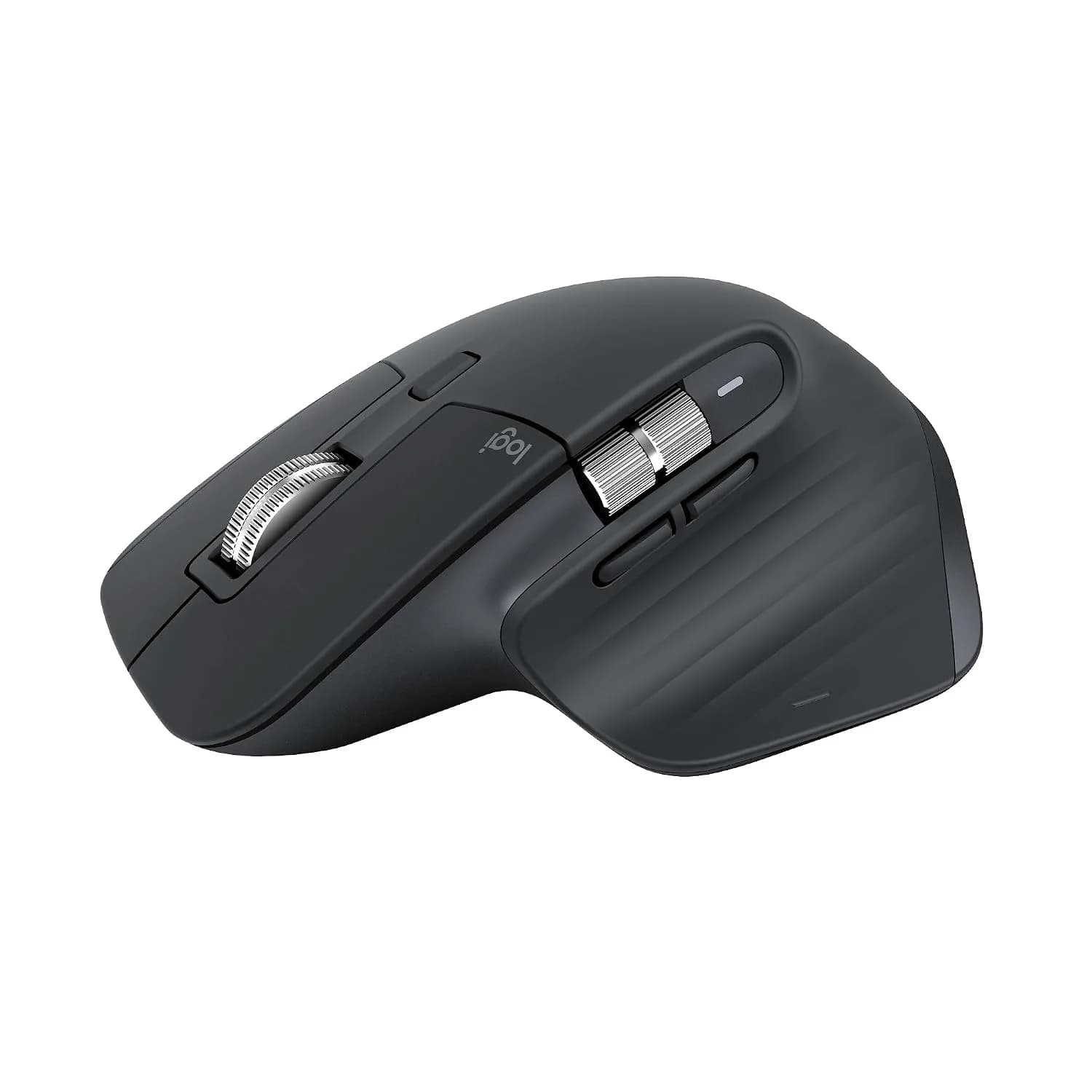
Representative photography — not the exact unit shipped.
Logitech MX Master 3S
In stock
The Logitech MX Master 3S Bluetooth Edition is a premium ergonomic mouse with an 8,000 DPI Darkfield sensor that tracks on virtually any surface (including glass), near-silent clicks, and MagSpeed scrolling — built for professionals who want precision and comfort during long work sessions, connecting via Bluetooth only.
Direct answer: is the Logitech MX Master 3S right for you?
Yes, if you're a professional or creative who wants a premium, ergonomic mouse with precise tracking (even on glass), ultra-quiet clicks, and multi-device Bluetooth switching. It's not the right fit if you're a gamer (low 125Hz polling rate, no RGB), left-handed (right-hand-only ergonomic shape), or want a USB receiver included — this specific edition is Bluetooth-only.
Logitech MX Master 3S
Editorial verdict
Grounded in published specifications
Summary verdict: The MX Master 3S remains one of the most refined productivity mice available, and the Bluetooth Edition variant is a sound choice specifically for buyers who don't need a USB receiver (e.g., using it with a laptop that already has good Bluetooth). Its main trade-offs versus the standard edition are the missing Logi Bolt receiver and Bluetooth-only reliance, which can occasionally be less consistent than a dedicated USB dongle in electromagnetically noisy environments (near other wireless devices) — a minor but real consideration for your "who should avoid" messaging.
Who should buy this
Professionals and creatives doing sustained daily computer work (design, writing, coding, spreadsheets) Buyers who want to switch between multiple devices (up to 3 via Bluetooth) quickly Anyone working on unconventional surfaces like glass desks Users who value quiet clicks in shared/office environments Right-handed users specifically (this is not ambidextrous)
Who should avoid this
Left-handed users — this is a right-hand-only ergonomic shape Gamers — 125Hz polling rate is well below gaming-mouse standards, and there's no RGB/gaming-focused feature set Buyers who specifically want a USB receiver included in the box (get the standard edition instead) Anyone on a tight budget — this sits at a premium price point compared to basic wireless mice like the M186/B170
Key strengths
- Excellent build quality and ergonomics for long work sessions
- Tracks accurately on almost any surface, including glass
- Near-silent clicks, good for shared spaces
- Long battery life with fast USB-C charging
Limitations
- Right-handed only, no left-hand or ambidextrous option
- Bluetooth Edition excludes the USB receiver (Bluetooth-only)
- Not suited for gaming (low polling rate)
- Premium price point vs. basic wireless mice
Technical specifications
- Type
- Wireless Ergonomic Performance Mouse
- Brand
- logitech
- Warranty
- 1 Year
- Model SKU
- 910-007502
Product overview
The MX Master 3S features a Darkfield 8K optical sensor with adjustable DPI up to 8,000, letting it track accurately on almost any surface, glass included. It has 7 buttons (including a gesture button and horizontal thumb scroll wheel), an electromagnetic MagSpeed main scroll wheel capable of scrolling 1,000 lines per second, and clicks that are up to 90% quieter than the original MX Master 3. It connects via Bluetooth Low Energy to up to 3 devices simultaneously, with quick device switching and Logitech's Flow feature for working seamlessly across multiple computers. The built-in rechargeable battery (500mAh Li-Po) lasts up to 70 days on a full charge, topped up via USB-C. It's right-hand ergonomic only (no left-handed or ambidextrous version), and works with Windows, macOS, Linux, ChromeOS, iPadOS, and Android via the Logi Options+ app. Important distinction for this specific edition: This is the Bluetooth Edition — it connects via Bluetooth only and does not include the Logi Bolt USB receiver that ships with the standard MX Master 3S. If your customers want USB-receiver connectivity as a backup to Bluetooth, they'd need the standard edition instead, not this one. Available colours/variants: Graphite (your ASIN) and Pale Grey are the two official colors for the Bluetooth Edition in most markets, per Logitech's India launch announcement listing Graphite and Pale Gray as the two colorways.
Key capabilities
- Darkfield 8K optical sensor, up to 8,000 DPI, tracks on glass
- 7 programmable buttons including gesture button and thumb scroll wheel
- MagSpeed electromagnetic scroll wheel (1,000 lines/sec)
- Up to 90% quieter clicks vs. MX Master 3
- Bluetooth Low Energy, connects to up to 3 devices
- Logitech Flow (cross-computer control)
- Built-in rechargeable battery, up to 70 days per charge, USB-C charging
- Logi Options+ app customization
Frequently asked questions
Does the Logitech MX Master 3S Bluetooth Edition come with a USB receiver?
No. This specific "Bluetooth Edition" connects only via Bluetooth and does not include the Logi Bolt USB receiver that ships with the standard MX Master 3S — if you need USB-receiver connectivity, you'd need the standard (non-Bluetooth Edition) version instead.
Can the Logitech MX Master 3S track on a glass desk?
Yes, its Darkfield 8K sensor is specifically designed to track accurately on virtually any surface, including glass, unlike standard optical sensors that struggle on transparent or reflective surfaces.
Is the Logitech MX Master 3S suitable for left-handed users?
No, it has a fixed ergonomic shape designed specifically for right-handed use, with no left-handed or ambidextrous version available in this product line.
Sample reviews
5 reviewsThese are illustrative, not customer reviews.
DealSurge has not sold this product, so nobody has reviewed it. Each entry below is written from the strengths and drawbacks recorded on this page, to show how reviews would appear — none of it is a real buyer’s experience, and none of it is counted in search results or given to the shopping assistant.
Mean of 5 samples
- 5 ★1
- 4 ★2
- 3 ★1
- 2 ★1
- 1 ★0
- 4 out of 5 stars, in a sample review of Logitech MX Master 3S
Happy with it, but go in informed
Excellent build quality and ergonomics for long work sessions. The one thing to know before ordering: Right-handed only, no left-hand or ambidextrous option. To be fair that is written on the product page. I skimmed past it and had to rearrange things afterwards.
Mohan H.Sample1 found this helpful - 3 out of 5 stars, in a sample review of Logitech MX Master 3S
Fine, once I adjusted my expectations
Leading with the problem, because it is what I would have wanted to read: Right-handed only, no left-hand or ambidextrous option. Bluetooth Edition excludes the USB receiver (Bluetooth-only). Neither is hidden — both are listed on the page — but they matter more in daily use than they look on a spec sheet. I have kept it, for one reason: Excellent build quality and ergonomics for long work sessions. That still outweighs the rest, but only just.
Uma R.Sample7 found this helpful - 2 out of 5 stars, in a sample review of Logitech MX Master 3S
My mistake, but read the avoid note
Genuinely my own fault. Posting so somebody else does not repeat it. The listing says who should avoid this: Left-handed users — this is a right-hand-only ergonomic shape Gamers — 125Hz polling rate is well below gaming-mouse standards, and there's no RGB/gaming-focused feature set Buyers who specifically want a USB receiver included in the box (get the standard edition instead) Anyone on a tight budget — this sits at a premium price point compared to basic wireless mice like the M186/B170. That was my situation and I ordered anyway. It does what it says on the page — it just was not the thing I needed.
Swati I.Sample7 found this helpful - 5 out of 5 stars, in a sample review of Logitech MX Master 3S
Right product for the right person
The page describes who this is for, and it described me: Professionals and creatives doing sustained daily computer work (design, writing, coding, spreadsheets) Buyers who want to switch between multiple devices (up to 3 via Bluetooth) quickly Anyone working on unconventional surfaces like glass desks Users who value quiet clicks in shared/office environments Right-handed users specifically (this is not ambidextrous). On that basis it has been the right call. Excellent build quality and ergonomics for long work sessions.
Varun V.Sample13 found this helpful - 4 out of 5 stars, in a sample review of Logitech MX Master 3S
After a few months
Had this three months now, so this is not an unboxing opinion. Tracks accurately on almost any surface, including glass. Still mildly irritated by one thing: Right-handed only, no left-hand or ambidextrous option. Known trade-off rather than a fault, though, and I would buy it again.
Karthik P.Sample6 found this helpful
The research behind this page
Independent guides that work through the numbers on this kind of product.