
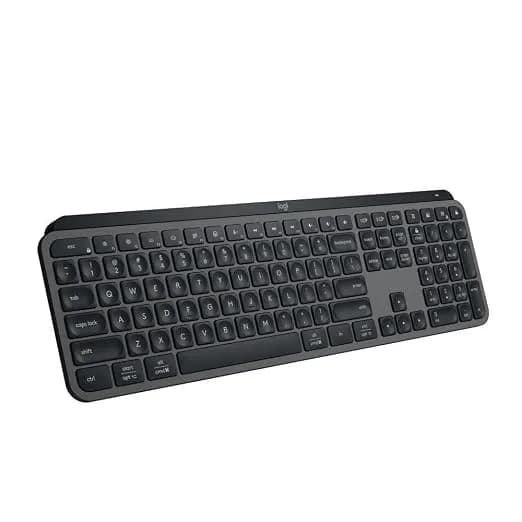
Representative photography — not the exact unit shipped.
Logitech MX Keys S Wireless Advanced Illuminated Keyboard
In stock
Wireless low-profile keyboard. Switches: Scissor, low profile -- not mechanical.
Direct answer: is the Logitech MX Keys S Wireless Advanced Illuminated Keyboard right for you?
1.8 mm of travel puts this between a laptop keyboard and a mechanical one, and that is a deliberate position rather than a compromise -- it is quiet enough for a shared room and more substantial than a laptop.
Logitech MX Keys S Wireless Advanced Illuminated Keyboard
Editorial verdict
Grounded in published specifications
Summary verdict: 1.8 mm of travel puts this between a laptop keyboard and a mechanical one, and that is a deliberate position rather than a compromise -- it is quiet enough for a shared room and more substantial than a laptop. The battery claim needs reading properly: about 10 days with the backlight on and up to 5 months with it off, so the headline figure assumes you leave it dark.
Who should buy this
Anyone typing all day in a shared space who wants quiet keys and multi-device switching.
Who should avoid this
Anyone who wants mechanical feedback, and gamers needing n-key rollover.
Key strengths
- Proximity backlight that adjusts itself to room light
- Flow types across three machines and moves files between them
- Aluminium top plate, so no flex at all
Limitations
- Scissor switches, not mechanical -- no tactile feedback
- About 10 days per charge with the backlight on, not 5 months
- 810 g and 43 cm wide, not a portable keyboard
Technical specifications
- Flow
- Types across up to 3 computers and copies files between them
- Brand
- Logitech
- Model
- 920-011560
- Layout
- Full size with numeric keypad
- Weight
- 810 g
- Battery
- About 10 days with backlight, up to 5 months without
- Switches
- Scissor, low profile -- not mechanical
- Warranty
- 1 Year Official Brand Warranty
- Backlight
- Proximity-activated, adjusts to ambient light
- Key travel
- 1.8 mm -- shallower than mechanical, deeper than a laptop
- Form factor
- Wireless low-profile keyboard
- Connectivity
- Bolt receiver or Bluetooth, up to 3 devices
- Not mechanical
- Scissor switches are quieter and lower but do not have the feedback of mechanical keys
Product overview
1.8 mm of travel puts this between a laptop keyboard and a mechanical one, and that is a deliberate position rather than a compromise -- it is quiet enough for a shared room and more substantial than a laptop. The battery claim needs reading properly: about 10 days with the backlight on and up to 5 months with it off, so the headline figure assumes you leave it dark.
Key capabilities
- Switches: Scissor, low profile -- not mechanical
- Layout: Full size with numeric keypad
- Backlight: Proximity-activated, adjusts to ambient light
- Battery: About 10 days with backlight, up to 5 months without
Frequently asked questions
Is the Logitech MX Keys S Wireless Advanced Illuminated Keyboard worth buying?
1.8 mm of travel puts this between a laptop keyboard and a mechanical one, and that is a deliberate position rather than a compromise -- it is quiet enough for a shared room and more substantial than a laptop.
What is the warranty and return policy for the Logitech MX Keys S Wireless Advanced Illuminated Keyboard?
1 Year Official Brand Warranty. Returns: 7 Days Replacement Guarantee.
Who is the Logitech MX Keys S Wireless Advanced Illuminated Keyboard best suited for?
Anyone typing all day in a shared space who wants quiet keys and multi-device switching.
Who should avoid the Logitech MX Keys S Wireless Advanced Illuminated Keyboard?
Anyone who wants mechanical feedback, and gamers needing n-key rollover.
Sample reviews
4 reviewsThese are illustrative, not customer reviews.
DealSurge has not sold this product, so nobody has reviewed it. Each entry below is written from the strengths and drawbacks recorded on this page, to show how reviews would appear — none of it is a real buyer’s experience, and none of it is counted in search results or given to the shopping assistant.
Mean of 4 samples
- 5 ★2
- 4 ★1
- 3 ★1
- 2 ★0
- 1 ★0
- 4 out of 5 stars, in a sample review of Logitech MX Keys S Wireless Advanced Illuminated Keyboard
Posting after real use, not unboxing
Had this most of a year now, so this is not an unboxing opinion. Flow types across three machines and moves files between them. Still mildly irritated by one thing: Scissor switches, not mechanical — no tactile feedback. Known trade-off rather than a fault, though, and I would buy it again.
Kabir S.Sample11 found this helpful - 5 out of 5 stars, in a sample review of Logitech MX Keys S Wireless Advanced Illuminated Keyboard
Matched my use exactly
The page describes who this is for, and it described me: Anyone typing all day in a shared space who wants quiet keys and multi-device switching. On that basis it has been the right call. Proximity backlight that adjusts itself to room light.
Asha S.Sample13 found this helpful - 5 out of 5 stars, in a sample review of Logitech MX Keys S Wireless Advanced Illuminated Keyboard
No notes
Proximity backlight that adjusts itself to room light. That was the whole reason I picked this over the cheaper options, and it is exactly as described. Also worth mentioning: Flow types across three machines and moves files between them. No regrets after two months.
Yash L.Sample2 found this helpful - 3 out of 5 stars, in a sample review of Logitech MX Keys S Wireless Advanced Illuminated Keyboard
Three stars, and here is exactly why
Leading with the problem, because it is what I would have wanted to read: Scissor switches, not mechanical — no tactile feedback. About 10 days per charge with the backlight on, not 5 months. Neither is hidden — both are listed on the page — but they matter more in daily use than they look on a spec sheet. I have kept it, for one reason: Proximity backlight that adjusts itself to room light. That still outweighs the rest, but only just.
Kavya J.Sample38 found this helpful
The research behind this page
Independent guides that work through the numbers on this kind of product.